Google

Sunday, October 13, 2013

How to Remove Buenosearch.com Browser Hijacker - Get Rid of Bueno Search Virus

is your homepage infected with Buenosearch.com? When you get online, all you can see is Bueno search? It annoys you very much? Is there any reputable way for you to uninstall Buenosearch.com hijacker from your computer?

Keep being redirected to Buenosearch.com?


Buenosearch.com ( also know as  Bueno Search, Bueno virus, Bueno search toolbar) is categorized as a browser hijacker virus which causes constant redirections on your browsers. Normally, Buenosearch.com virus is prompted to change system DNS setting so that it can be added to Google Chrome, Internet Explorer and Mozilla Firefox. Bueno Search hijacker looks like a reputable search sever. It seems to provide conveniences like google, yahoo and bing. However, this application delivers junk search results, You notice the situation because Buenosearch.com virus keeps redirecting you to unfamiliar advertising sites.

Thursday, October 10, 2013

Canadian Association of Chiefs of Police Virus Removal Instructions - How to Unlock


Are you seeking help to unlock your computer from Canadian Association of Chiefs of Police Virus? This ransomware locks your computer all of sudden? Now you cannot seem to load desktop or surf online? Canadian Association of Chiefs of Police Virus completely takes over the computer and stop you from using? Read the post here to deal with Canadian Association of Chiefs of Police malware without pyaing the fine.

Your computer has been blocked by Canadian Association of Chiefs of Police virus


Canadian Association of Chiefs of Police ( also known as Ministry of Public Safety Canada virus or CACP Virus) is classified as a ransomware application that has been created by hackers to do Internet criminal. It aims to earn money from users located in Canada. Usually it automatically displays the massage when the desktop is up, stating that computer has been blocked because of the distribution of illegal use/download or music, video and software. Besides, seeing pornographic is claimed to be another reason. Please note, Canadian Association of Chiefs of Police virus pops up bogue notifications. It misleads users in order to make money.

Canadian Association of Chiefs of Police virus uses the name and l0ogo of legitimate Canadian Association of Chiefs of Police or Ministry of Public Safety Canada to make it more reliable. It is very similar to FBI MoneyPak virus and United Kingdom Police PCEU virus, asking money to unlock users with providing false alerts. Some victims feel so scared and they made decision to transfer the fine/fee ( the total amount of 100 CAD). However, nothing is changed after paying the money. Why did it happen? Canadian Association of Chiefs of Police warning is fake and is considered as a trick. It is extremely perilous, modifying system startup setting and configurating itself to boot automatically. Thus, you can do nothing on the infected computer. With computer being compromised, Canadian Association of Chiefs of Police virus may steal users’ personal information and exploit for money. More seriously, it would drop additional computer infections to mess up windows entries. As time passes by, the computer cannot be turned on and becomes unrepairable. We recommend to get rid of Canadian Association of Chiefs of Police scam virus quickly as you can.

Canadian Association of Chiefs of Police ransom virus needs to be effectively blocked via manual removal. Read the following guide. Please Live Chat with 24/7 Online PC Expert without hesitation if you need instant help on removal procedure.

Guide to Block Web.audreyandalan.com Popup on Computer - Manual Removal


Trying to remove Web.audreyandalan.com popup from your computer but fail? It redirects your homepage and search results? You have reputable Auto Removal tools but no luck? The following manual removal guide would walk you though step by step.

Basic Information of Web.audreyandalan.com pop-up


Web.audreyandalan.com is a misleading website that is categorized as a browser hijacker virus. Normally, Web.audreyandalan.com gets inside out of permission. Once you are using computer unsafely, like visiting porn or gamble site, opening spam email attachment or downloading free softwares. It can be easily added to Internet Explorer, Mozilla Firefox and Google Chrome. Once executed, Web.audreyandalan.com may fill the computer with annoying advertisements and unknown applications.  The infected computer experiences slows internet, crashing browser and freezing surfing all the time. It makes your act wired and runs in a low quality.

When Web.audreyandalan.com splits into the computer, it would start alter windows registry entries, system DNS setting and browser provider. Suddenly Web.audreyandalan.com has been configurated to automatically load up desktop. Every time you use your browsers, it won’t go away. It is quite aggressive that Web.audreyandalan.com appears as your homepage and redirect google search results. Commercial sites with numerous pop-up ads take over the browsing activities. No matter what you are clicking on, you are redirected to marketing sites. Web.audreyandalan.com malware is a program associated with the third party, which hijacks users browsers for illegal purposes. It may allow cyber criminal and exploit users’ personal information. Besides, hackers may modify windows registries to make it vulnerable. So we advise to get rid of Web.audreyandalan.com hijacker as quickly as you can.
Uninstall  Web.audreyandalan.com popup Now

Tuesday, October 8, 2013

How to Get Rid of PC Optimizer Pro Virus - PC Optimizer Pro (Rogue) Uninstall


Basic Information of PC Optimizer ProVirus


PC Optimizer Pro virus is refereed to rogue infection that comes from fake Anti-spyware family. Similar to notorious Antivirus Security Pro, PC Optimizer Pro reports fake scanning results. It enters into the computer for a sole purpose, which is to get money from naives. PC Optimizer Pro looks like a legitimate security program, starting scanning, reporting threats and trying to fix computer problems. However, this program acts abnormal because it requires money to remove all found threats and fix system errors. Usually, PC Optimizer Pro makes victims think computer is attacked by numerous infections like Trojan, worm or spyware. Beside, it displays false reports, stating that computer experience many errors. Thus, money would be needed to purchase the registered version. Please note, PC Optimizer Pro is a virus and it can help nothing. Do not pay money for nonexisted activated codes.

Attention
Suspicious software activity is detected by PC Optimizer Pro on your computer.Please start system files scanning for details.
Warning!
Name: taskmgr.exeName: C:\WINDOWS\taskmgr.exe


PC Optimizer Pro is distributed though hacked domains, which install software in attempt to take advantage of system vulnerability. So it is not surprised that you installed PC Optimizer Pro out of consent. It appears automatically when logging into desktop. The performance of PC Optimizer Pro affects all browsing activities. It terminates any running progresses and keep you from visiting certain pages. Besides, this malware modifies start page, homepage and default search engine. More seriously, PC Optimizer Pro can install redundant applications like toolbar, adware even malwares. So we recommend to get rid of PC Optimizer Pro virus as early as possible.

PC Optimizer Pro Virus Screen Shortcut


Once executed, PC Optimizer Pro virus keeps asking users to purchase its activated license. It pops up security alert no matter what you are doing on the internet. It states you are vising an unsafe site or opening a malicious program. However, you are doing the right things, which are not associated with virus at all. Victims need to realize how hazardous it is. This program relies on hackers and is used to scam users’ financial information. Clearly, this malware cannot be stopped or blocked by reputable removal tools. So we consider using manual removal to permanently delete PC Optimizer Pro virus.

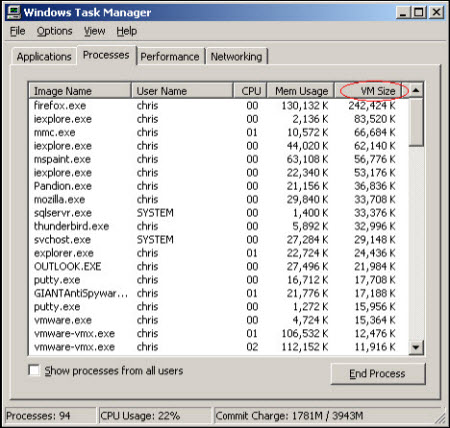
Step one: open task manager by tapping (Ctrl+Alt+Del) together to stop related process
 PC Optimizer Pro.exe


Step two: Located and get rid of all files associated
%StartMenu\shl.exe
%\Programs\Startup\shl.exe
%AppData%\shl.exe

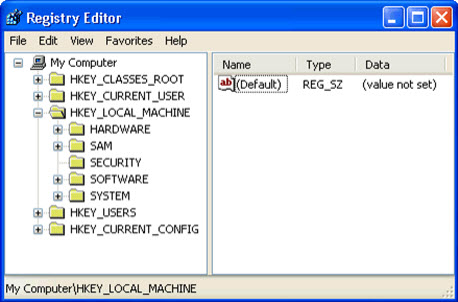
Step three: Open Registry Editor to eliminate all registries related 


HKEY_CURRENT_USER\Software\Microsoft\Internet Explorer\Download "RunInvalidSignatures" = HKEY_CURRENT_USER\Software\Microsoft\Internet Explorer\LinksBar "Enabled" = HKEY_CURRENT_USER\Software\Microsoft\Internet Explorer\PhishingFilter "Enabled" = HKEY_CURRENT_USER\Software\Microsoft\Internet Explorer\PhishingFilter "EnabledV9" = HKEY_CURRENT_USER\Software\Microsoft\Windows\CurrentVersion\Internet Settings "HKEY_CURRENT_USER\Software\Microsoft\Windows\CurrentVersion\Internet HKEY_CURRENT_USER\Software\Microsoft\Windows\CurrentVersion\Policies\Associations "HKEY_CURRENT_USER\Software\Microsoft\Windows\CurrentVersion\Policies\Attachments

Step four: Uninstall PC Optimizer Pro
1) Click the “start” button on the lower left corner of your desktop
2) Double click the button “Control Panel” to process
3) Highlight  “Add / Remove Program” icon from Ctrol Panel
4)Select the PC Optimizer Pro icon in the list,
5)Click”Remove” icon to uninstall PC Optimizer Pro
6) Press OK to apply the changes.
7)Reboot your computer to make sure it works

This is a self guide removal procedure, if you need any further help, please get in touch with us. 
LIVE EXPERT

How Do I Get Rid of Sweetpack Virus - Sweetpack Search Toolbar Uninstall


Are you annoyed by a program named Sweetpack? You tried hard to get rid of Sweetpack virus from computer but no luck? How do you uninstall Sweetpack toolbar? 

Basic Information of Sweetpack virus (Start.sweetpacks.com/Sweetpack Search)


Sweetpack is distributed as an adware program that generates from a URL Start.sweetpacks.com. It looks like a search toolbar and seems to provides convenience. However, Sweetpack virus comes bounded with free software downloads and it displays fake search results. No matter you are trying to search from Sweetpack, it would redirect you to advertising sites. So many computer consider this hijacker as a malware.

Sweetpack is created to increase web traffic. Very often your homepage is changed to Start.sweetpacks.com without your permission. The situation happens to the browsers including Internet Explorer, Google Chrome and Mozilla Firefox. Sweetpack toolbar never enhance users’ browsing activities. It is recommended to delete Sweetpack virus immediately.

Remove Sweetpack virus (Start.sweetpacks.com/Sweetpack Search) Now

Sweetpack virus, also known as Start.sweetpacks.com redirect or Sweetpack Search, is used for internet criminal. It enters into users’ computer and modifies windows setting to make its job easier. This hijacker is quite capable to redirect your search results. Once executed, it adds cookies or key loggers to track users’ browsing activities and Internet habit. Thus, Sweetpack may meet your interests by offering related goods or services. Please note, Sweetpack malware is promoted by the third party which is associated with Trojan, worm and spyware, scamming users’ money and messing up the compromised computer.

Once infected by Sweetpack toolbar program, the computer may become vulnerable. It can exploit users’confidential information and allows cyber criminal. Besides, it slows down Internet performance and crashes down browsers from time to time. Most of victims feel aggressive but cannot find a way to get it off. Please read the following removal instructions.

Step 1 Find the delete the following files and entries
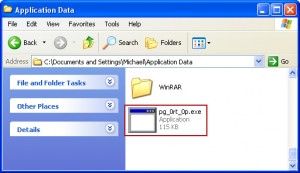
%AppData%\searchtoolbar\coupons\merchants2.xml
%AppData%\searchtoolbar\dtx.ini
%AppData%\searchtoolbar\guid.dat
%AppData%\searchtoolbar\log.txt


HKEY_LOCAL_MACHINE\SOFTWARE\Microsoft\Windows\CurrentVersion\policies\system\ConsentPromptBehaviorAdmin 0
HKEY_LOCAL_MACHINE\SOFTWARE\Microsoft\Windows\CurrentVersion\policies\system\ConsentPromptBehaviorUser 0
HKEY_LOCAL_MACHINE\SOFTWARE\Microsoft\Windows\CurrentVersion\policies\system\EnableLUA 0
HKEY_LOCAL_MACHINE\SOFTWARE\Microsoft\Windows NT\CurrentVersion\Image File Execution Options\AAWTray.exe

Step 2 Uninstall Sweetpack virus from Control Panel
Windows 8
Move mouse cursor to the bottom right corner of the screen. Click Settings on Charms bar and go to Control Panel. Select Uninstall a program and remove Start.sweetpacks.com related programs.

Windows XP
Go to Start, navigate to Settings and click on Control Panel, navigate to Add or Remove Programs, choose Programs and Features, find Start.sweetpacks.comt related programs, and hit Remove.

Windows 7/Vista
Go to Start, navigate to Control Panel, select Uninstall a program/Programs and Features, find Start.sweetpacks.com related programs, and click on Uninstall.

Step 3 Terminate related process from Task Manager
.Sweetpack.exe

What should be done to get rid of Sweetpack virus from windows registry? It installs toolbars, adware and other unwanted applications without your approval? This hijacker cannot be removed by system removal tools? It won’t go away and automatically open with a new tab? The browsing activities become abnormal and computer is significantly slow? How to Fix?

Cannot process the manual removal by yourself? Ask Help from MiTechMate Experts 24/7 Online.
chat with online expert

Monday, October 7, 2013

The ICE Cyber Crimes Center Virus Removal Instructions


Your Computer has beeen blocked by The ICE Cyber Crimes Center Virus?


The ICE Cyber Crimes Center Virus is identified as a ransomware program that generates from MoneyPak virus. It is a typical variant of FBI MoneyPak virus that blocks targeted computer in order to earn money. The ICE Cyber Crimes Center Virus is a fraudulent program because it steals name and logo of authorized government. Computer users feel scared by the warning and they can do nothing on the infected PC. The ICE Cyber Crimes Center Virus is very severe and makes changes on windows startup setting, so that it can block your desktop and automatically pop up. It can take over the computer by damaging windows entries and files. Besides, The ICE Cyber Crimes Center Virus exploits users’ money not only from the fake warning, it can steal financial information. We should remove The ICE Cyber Crimes Center Virus quickly to avoid further damages.
Get Rid of The ICE Cyber Crimes Center Virus Now

The ICE Cyber Crimes Center Virus Delivers Fake Warning


ICE
The ICE Cyber Crime Center
Your computer has been blocked The work of your computer has been suspended on the grounds of unauthorized cyber activity.
Possible violations are described below:Article -174. Copyright Imprisonment for the term of up to 2-5 years(The use or sharing of copyrighted files). A fine from 18,000 up to 23,000 USDArticle – 183. Pornography Imprisonment for the term of up to 2-3 years(The use of distribution of pornographic files). A fine from 18,000 up to 25,000 USDArticle – 184. Pornography involving children (under 18 years)Imprisonment for the term of up to 10-15 years(The use or distribution of pornographic files). A fine from 20,000 up to 40,000 USDArticle – 104. Promoting Terrorism Imprisonment for the term of up to 25 years without appeal(Visiting the websites of terrorist groups). A fine from 35,000 up to 45,000 USDArticle – 68. The distribution of virus programs Imprisonment for the term of up to 2 years(The development or distribution of virus programs, which have caused harm to other computers). A fine from 15,000 to 28,000 USD…To unlock your computer and to avoid other legal consequences you are obligated to pay a release fee of $300 USD.An attempt to unlock this computer by yourself will lead to the full formatting of the operating system. All the files, videos, photos, documents on your computer will be deleted.

Once infected by The ICE Cyber Crimes Center Virus, the massage would pop up immediately when lunching desktop. It states that computer performances are involved illegal online activities, which are refereed to illegal downloads of music, video, software and the distribution of pornographic. Thus, the computer is blocked due the the law in America. However, The ICE Cyber Crimes Center Virus provides bogue notifications to threaten victims, asking a fee/fine of $200. $300, $400, $450 or $500.

No security tools can block The ICE Cyber Crimes Center Virus. It keeps showing up, which is very annoying and aggressive. Some victims tried to unlock the screen by transferring the payment, but fail. Computer is still locked. Why? Because hackers would never agreed to users’goods, they makes use of The ICE Cyber Crimes Center Virus to exploit as much as they can to earn money.


Guide to effectively get rid of The ICE Cyber Crimes Center Virus.


The ICE Cyber Crimes Center Virus is very pesky and is able to bypass any protection programs. No worries, this malware can be uninstalled from your computer with manual removal. Please read the following guide to delete The ICE Cyber Crimes Center Virus.

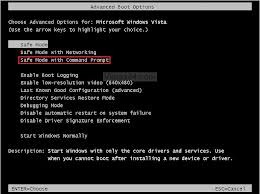
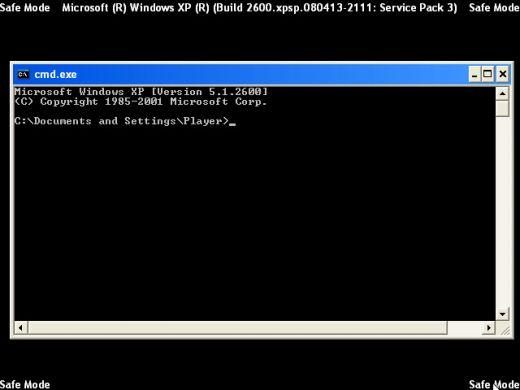
Step one: Boot your computer and get into Safe Mode with Command Prompt 

Restart your computer> keep tapping F8 untill you see advanced boot option> select Safe Mode with Command Prompt> hit Enter button to access


Step Two: Input the command to disable all startup items associated 

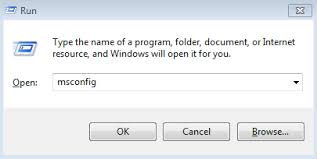
1. Input msconfig into the box then press Enter
2. Click the msconfig search result. The utility will open in a new window.
3. Click the Startup tab. You'll see a list of programs that start when your computer starts.
4. To stop a program from automatically launching when you boot the PC, uncheck the box next to its entry.
5.When you are finished deselecting startup items, click OK and restart your PC to the normal mode.

 Step three: Boot your computer normal mode and remove all associated files 
%appdata%\[random].exe
%Windows%\system32\[random].exe
%Documents and Settings%\[UserName]\Application Data\[random].exe
%Documents and Settings%\[UserName]\Desktop\[random].lnk
%Documents and Settings%\All Users\Application Data\The ICE Cyber Crimes Center Virus

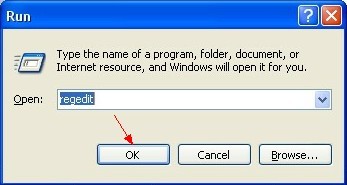
 Step four: Open Registry Editor> Open Start Menu, type  Regedit> click OK.>remove the following registry entries 

HKU\.DEFAULT\Software\Microsoft\Internet Explorer\SearchScopes\{AFBCB7E0-F91A-4951-9F31-58FEE57A25C4}
HKU\S-1-5-19\Software\Microsoft\Internet Explorer\SearchScopes\{AFBCB7E0-F91A-4951-9F31-58FEE57A25C4}
HKU\S-1-5-20\Software\Microsoft\Internet Explorer\SearchScopes\{AFBCB7E0-F91A-4951-9F31-58FEE57A25C4}
HKCU\Software\Microsoft\Internet Explorer\Toolbar\WebBrowser [{EBD898F8-FCF6-4694-BC3B-EABC7271EEB1}]
HKCU\Software\Microsoft\Internet Explorer\Toolbar\WebBrowser [{EBF2BA02-9094-4C5A-858B-BB198F3D8DE2}]


NOTE: Please ignore the fake alerts provided by The ICE Cyber Crimes Center Virus. Please contact your bank company if unfortunately you have sent the money. To unlock the compromised computer, transferring the payment can help nothing. The best way to save money and computer security it to remove The ICE Cyber Crimes Center Virus from your computer. This malware is malicious but it is not true,  you will never be put into jail or suffered from jail sentence. All warnings are fake. 


More variants of FBI MoneyPak have been found Nowadays 


Mandiant USA Cyber Security virus
United State Homeland Security Virus
FBI Department of Justice Virus
Dirty Decrypted.exe Virus
European Cybercrime Centre 
FBI Cybercrime Division Scam


The ICE Cyber Crimes Center Virus is a scam program. Please get it off as quickly as you can. If you have any doubts with this manual removal, please get in touch with us.

Sunday, October 6, 2013

Know How to Manually Get Rid of Static.salesresourcepartners.com Hijacker


Learn more from Static.salesresourcepartners.com Redirect


Static.salesresourcepartners.com is a browser hijacker virus that jumps up automatically on your browsers. It is not a safe site and really does damages to the infected computer. Static.salesresourcepartners.com is used for illegal hijacking program and is promoting internet criminal. It is reported that Static.salesresourcepartners.com provides adwares, sponsored links and ads banners whenever you are surfing on the internet. It is very certain that Static.salesresourcepartners.com is associated with the third party, aiming to violate users’ money. It is a big threat to users’ privacy. Please get rid of it as quickly as you can.